LinkedIn Ads for B2B: A Cost and Fit Decision Model
Decide if LinkedIn Ads fit one B2B test through audience options, objective, full cost, privacy, tracking, sales evidence, and stop rules.

LinkedInAds can fit a B2B test under the right terms. The audience, goal, offer, next step, data, budget, and sales work must serve one clear question. A high CPM alone does not prove high cost or high value. A profile field does not prove that a member can or will buy.
Use this guide to plan one bounded test. It helps the ad and sales teams set three things. They need a clear lesson, a sound measure, and a stop rule.
Start With One Business Question
Write the question before you open Campaign Manager. Name the buyer, offer, market, and sales stage. Add the next act, value rule, budget, dates, owner, and stop rule.
“Will LinkedIn work for us?” is too broad. It cannot guide the audience, ad, budget, or sales reply. Ask if one named group will take one named action. Tie it to one offer, a set time, and a cost limit.
Define the action in plain business terms. It could be a valid form, a booked call, or a lead that sales accepts. State who checks the result and when. Set the budget limit and the rule that will pause the test.
Keep the question narrow enough to answer. One test cannot prove audience fit and offer fit at once. It also cannot prove ad quality, sales speed, and revenue impact. Pick the choice that matters now. Record the other limits.
Check Current Audience Options and Limits
LinkedIn lists many ways to form an audience. They include place, language, company, job history, school, interests, traits, age data, devices, and Matched Audiences. The choices can vary by account, goal, place, and member settings. Check the live account and current help page first.
Some member traits have more limits in the European Economic Area and Switzerland. LinkedIn also limits ad targeting based on sensitive data. A test on a protected or sensitive topic needs two reviews. Check the current platform rules and use a skilled policy owner.
Treat a profile field as an input, not proof of fit. A job title does not show budget control or present need. It also does not show timing or interest in the offer. Company size and industry labels can be missing or stale.
Write the needed and banned traits in an ideal customer profile. Compare that record with the live account. If the account cannot state a vital rule, log the gap before launch.
Check the audience estimate and any minimum in the live tool. An audience can meet the rules yet still be too small or slow. Do not widen it only to start delivery. Widen it only if the new group still answers the core question.
Choose the Objective That Matches the Action
LinkedIn groups ads by their goal. Goals include brand awareness, site visits, engagement, video views, lead forms, and site conversions. Formats, bids, and delivery rules depend on the goal and setup.
Choose the goal that matches the act you need. Reach can show that the ad was served. A click shows an action on the ad. A video view uses the platform's view rule. None of these events is an accepted sales lead by itself.
LinkedIn Lead Gen Forms can collect data in the platform. State which fields make a lead valid. Name the person who checks them. A form that fails the buyer or consent rules is not an accepted lead.
A site conversion test needs tracking. Name and test the event before launch. A button click or thank-you page view can help. It is not a closed deal.
Write the goal, event, business meaning, and owner in the test log. This stops an easy platform count from being called a business result.
Compare Full Test Cost, Not CPM Alone
CPM prices one thousand impressions. It leaves out the work around the test. It also does not show what those views led to.
Count the full test cost. Add media, ad work, page work, tracking, consent review, and CRM setup. Add sales review, follow-up, and report work too. Record staff time or supplier cost for the same dates. Do not make up values when a record is missing.
Compare channels only when the test terms match. Use the same audience, market, offer, action, credit rules, and dates. Do not equate a form in one setup with a call in another. A view-through conversion is also a different event.
Set a spend cap the business can bear if the test fails. Choose the cost measure before launch. It could be cost per valid form or per sales-accepted lead. Review both the ad cost and the wider work cost at the end.
Build the Ad and Next Step as One Path
The ad, form or page, reply, routing, and sales work are one path. Match the promise and proof. Then match the format, call to action, fields, next step, and owner.
If an ad offers a guide, the next step should give that guide. If it asks for a work phone, say how it will be used. If the reply page promises contact, set the owner and due time first.
Use only the fields needed for the named action. More fields can add sales context. They also add data and work. Let the sales, privacy, and ad owners agree on the least they need.
Check the current ad specs for the chosen format. For a single image ad, check the image shape and file type. Check the text limits, final URL, and call-to-action choice too. Use the current LinkedIn help page and live account. Preview the real ad and next step on desktop and mobile.
Set Privacy, Consent, and Tracking Before Launch
LinkedIn says the Insight Tag can track site events and form site audiences. The ad owner still must give needed notice and seek needed consent. LinkedIn says not to put the tag on pages with sensitive data. Check the current rules. Give legal choices to the right owner.
LinkedIn requires a privacy-policy URL for a Lead Gen Form. The form should state how the data will be used. Add any needed notice and consent box for the planned contact or use.
Limit who can see the leads. Set the route to the CRM or lead reviewer. Set the keep and delete rules. Test the field map with safe test data. Make sure an error, copy, or wrong-fit form is not accepted by default.
Use the same care for tracking. Name each event and where it fires. Name who checks it and which consent state applies. A tag or event does not prove that all privacy rules are met.
Run a Bounded Test
Freeze the test log before launch. List the exact ad and page or form versions. Add the audience, goal, delivery rules, budget, dates, main measure, safety limits, owner, and stop rule.
Change one planned part at a time. A new offer, audience, image, and form can blur the result. The team will not know which change mattered. Use the paid-ad creative testing framework to set the control. It also covers the named change and choice rule.
Do not copy a set budget or run time. Delivery needs depend on the group, offer, market, setup, and account. Use the live estimate as a planning aid. Then apply the firm's own limit.
Pause when a set safety rule fails. Wrong-fit forms, a broken form, a bad consent path, or a spend error call for review. Record the stop and the version that ran. Do not edit the test in place and treat all dates as one run.
Read Platform Metrics With Their Limits
Read each metric by its current meaning. Keep spend, reach, views, clicks, form opens, forms, and conversions apart. Save the credit window and conversion source with the report.
LinkedIn says its reports can include results after ad clicks or views. Some setups can use modeled, estimated, or group data. These methods help explain the platform total. They do not name a person or prove a sale.
Do not call a click a lead. Do not call a platform conversion a closed deal. Show the event that the system logged. Then add the sales result from the business record.
Keep known gaps beside the totals. Note lost tracking, consent limits, copied leads, missing CRM fields, and late sales checks. Add any change made during the run. This keeps the report useful without overstating the counts.
Reconcile Marketing With Sales Evidence
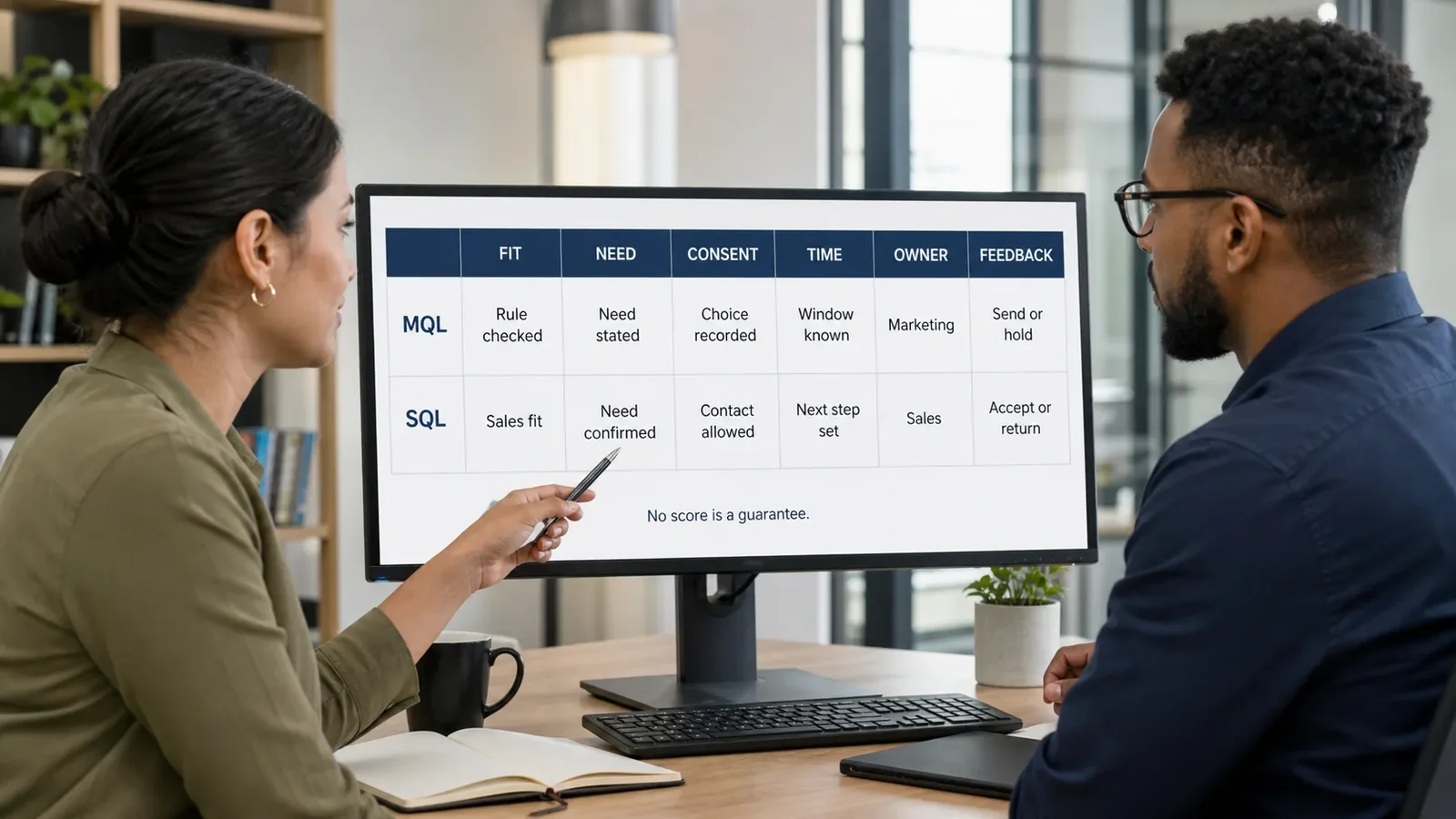
Agree on sales terms before launch. Define a valid form, copy, wrong fit, accepted lead, reached lead, and sales-ready lead. Define an open deal, lost reason, and value too. Give each term an owner and due time.
The ad team should pass the source, test, version, and consent record. It should pass only the fields that sales can receive. Sales should send back its check on time. Keep rejected leads and the reason as well as accepted leads.
Match the platform report with CRM or sales records by an allowed method. Show both counts when they differ. Do not force a match by deleting or renaming records.
A deal after a LinkedIn reply can have more than one source. Search, email, events, referrals, and past sales work can all play a part. Do not claim that LinkedIn caused revenue without sound proof. If that proof is absent, report the accepted-lead and pipeline facts.
Verify the Exact Public Release
Apply TTGC's page rules to the exact CMS version. Use one H1 for the main title. Step from H1 to H2 to H3 with no skip. Keep the meta description from 70 to 160 characters. Check the Mherie byline and author route. Check the canonical URL, index state, first date, and live state.
Read the CMS record back. Compare it with the passed draft. Open both internal links and each cited source. Check that the hero fits the subject. It needs a source record and true alt text.
Load the public URL on desktop and mobile. Require HTTP 200. Check the exact title, opening, body, meta data, byline, links, and call to action. View the full page at both sizes.
Mark the article complete only after the public version passes. A saved edit is not enough. A preview or desktop check alone is not enough.
Decide Whether LinkedIn Ads Fit the Next B2B Test
TTGC can help map the buyer, objective, offer, ad, form or page, tracking, sales handoff, and stop rules for one bounded test. Your privacy, legal, platform, finance, analytics, and sales owners still approve the parts they govern.
Source notes
LinkedIn sources describe current products and can change. They do not promise results. They also do not replace privacy, legal, or market review. The full-cost model, sales handoff, test log, and release list are TTGC editorial guidance.
Sources
- LinkedIn Help, "Targeting Options for LinkedIn Ads"
- LinkedIn Help, "Marketing Objectives Available for Your Ad Campaigns"
- LinkedIn Help, "LinkedIn Insight Tag"
- LinkedIn Help, "Lead Gen Forms Privacy Policy"
- LinkedIn Help, "LinkedIn Conversion Tracking Reporting and Metrics"
- LinkedIn Help, "Single Image Ads Advertising Specifications"