What Is a Content Management System?
Learn what a CMS is, how content, models, roles, workflows, media, previews, and publishing connect, and where vendor control ends.

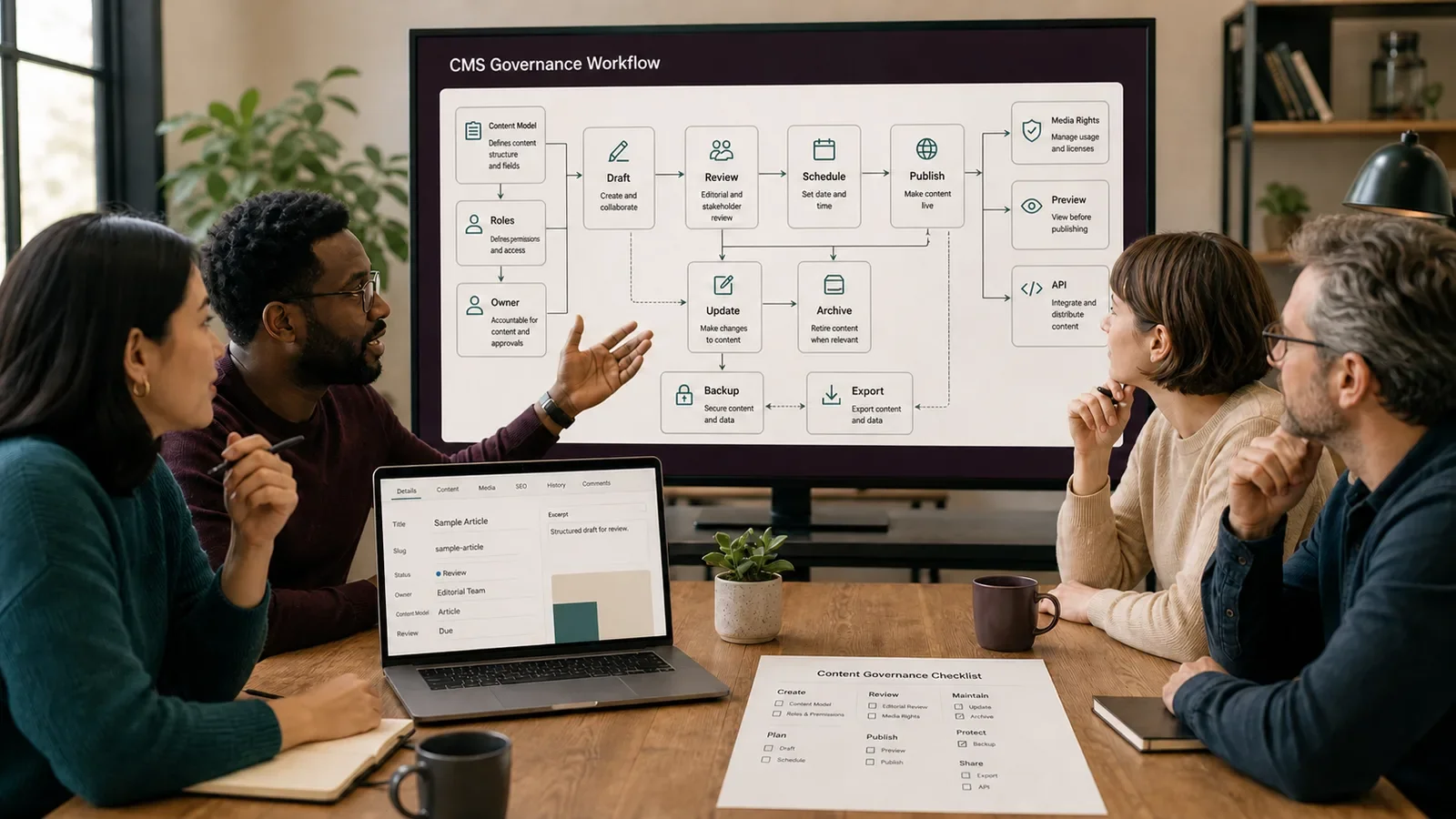
A content management system, or CMS, is software used to create, organize, change, publish, and remove digital content. A CMS may manage text, media, page fields, links, code blocks, and other structured data.
A CMS is not the website by itself. The site also depends on templates, code, hosting, domains, data, integrations, access, and the rules that turn saved content into a page or app.
Put It in Plain Words
A content model defines the fields and ties behind each item, such as title, author, date, body, hero, status, and related pages.
A role decides who can read, write, review, publish, export, or remove content. Give each person only the access the work needs.
A workflow moves an item through draft, review, sign-off, schedule, publish, update, and retirement. A status label is useful only when the site obeys it.
A preview should show the real template and state. A field form alone cannot prove that the final page is usable.
Media needs alt text, rights, source, size, and use records. An upload folder is not a rights system.
Keep backups and test an export. A vendor promise is not proof that the team can recover its content and files.
Patch the CMS and its add-ons. Remove old accounts and unused parts before they become a risk.
Record redirects and canonical URLs when pages move or merge. Deleting a row can break public links.
A headless CMS sends structured content through an API to another front end. A traditional CMS may manage content and page display in one system.
Choose from the real needs, team skills, data risk, life cost, and exit path. A long feature list is not a sound decision.
How Does Content Management System Work?
Editors save content in fields or blocks. The CMS stores it, applies roles and workflow rules, and gives templates or APIs the data needed to render a site, app, email, or other output.
Owners manage the model, users, releases, media, backups, updates, exports, and retirement. They verify both saved data and public output after a change.
Why Is It Important?
A CMS can help many people manage content with a shared model and review path. It can also make reuse, updates, search, and audits easier.
Weak models, broad access, stale plug-ins, vendor lock-in, and broken publish rules can turn the CMS into a source of drift or risk.
Where Is It Used?
Websites, articles, stores, help centers, portals, apps, and knowledge bases.
Editorial workflows, media libraries, page models, APIs, and scheduled content.
Small sites, multi-site programs, language versions, and content reuse.
A Simple CMS Example
An article model has fields for title, summary, author, date, body, sources, hero, alt text, SEO, status, and next review. An editor drafts while a reviewer can approve but not change server settings.
The site shows only items whose approved status and date both allow public use. The team tests this rule before it trusts the schedule.
What Should a CMS Plan Include?
Content types, fields, blocks, links, and validation.
Roles, sign-in, review, sign-off, publish, and audit logs.
Templates, preview, API, cache, and public-state rules.
Media, rights, alt text, source, sizes, and cleanup.
Backups, exports, patches, incidents, and vendor exit.
Owners, support, training, cost, and retirement.
How Do You Choose or Set Up a CMS?
List content tasks, risks, people, outputs, and life span.
Design and test the content model before bulk entry.
Set narrow roles and a real review path.
Build templates, preview, APIs, and public-state checks.
Test backups, exports, restores, redirects, and updates.
Train owners and review access, cost, and stale content.
Headless CMS vs. Traditional CMS
A headless CMS focuses on content and sends it through an API. The front end is a separate system. A traditional CMS often joins editing, templates, plug-ins, and page output.
Neither type is best for every team. Headless work can add build and preview needs; a joined system can add template or vendor limits. Compare the full operating model.
Common Mistakes
Choosing from demos before mapping content and workflow.
Giving every editor admin access.
Treating preview, backup, and export as optional.
Adding plug-ins with no owner or patch plan.
Deleting pages without redirects and source records.
Frequently Asked Questions
Is a CMS the same as web hosting?
No. The CMS manages content. Hosting runs the systems and files that serve the site. One vendor may sell both, but the roles differ.
What is a headless CMS?
It stores and manages content while another system asks for that content through an API and renders it for the user.
Can a CMS improve SEO?
It can support titles, links, structured fields, sitemaps, redirects, and speed work. It does not guarantee good content, index use, rank, or results.
Compare architectures in Headless CMS vs. Traditional CMS and use Your CMS Is Not Your Problem before blaming a tool for a process flaw.
Need a CMS plan that covers the full content life instead of only the editor screen?
Book a free Brand and Tech Assessment to map the current problem, evidence, constraints, and practical next step.
Sources
- MDN Web Docs: CMS glossary. https://developer.mozilla.org/en-US/docs/Glossary/CMS
- W3C WAI: Essential Components of Web Accessibility, including authoring tools. https://www.w3.org/WAI/intro/components