What Is a Topic Cluster?
Learn how a topic cluster connects one broad canonical page with distinct supporting pages, and how intent, links, gaps, consolidation, and updates work.

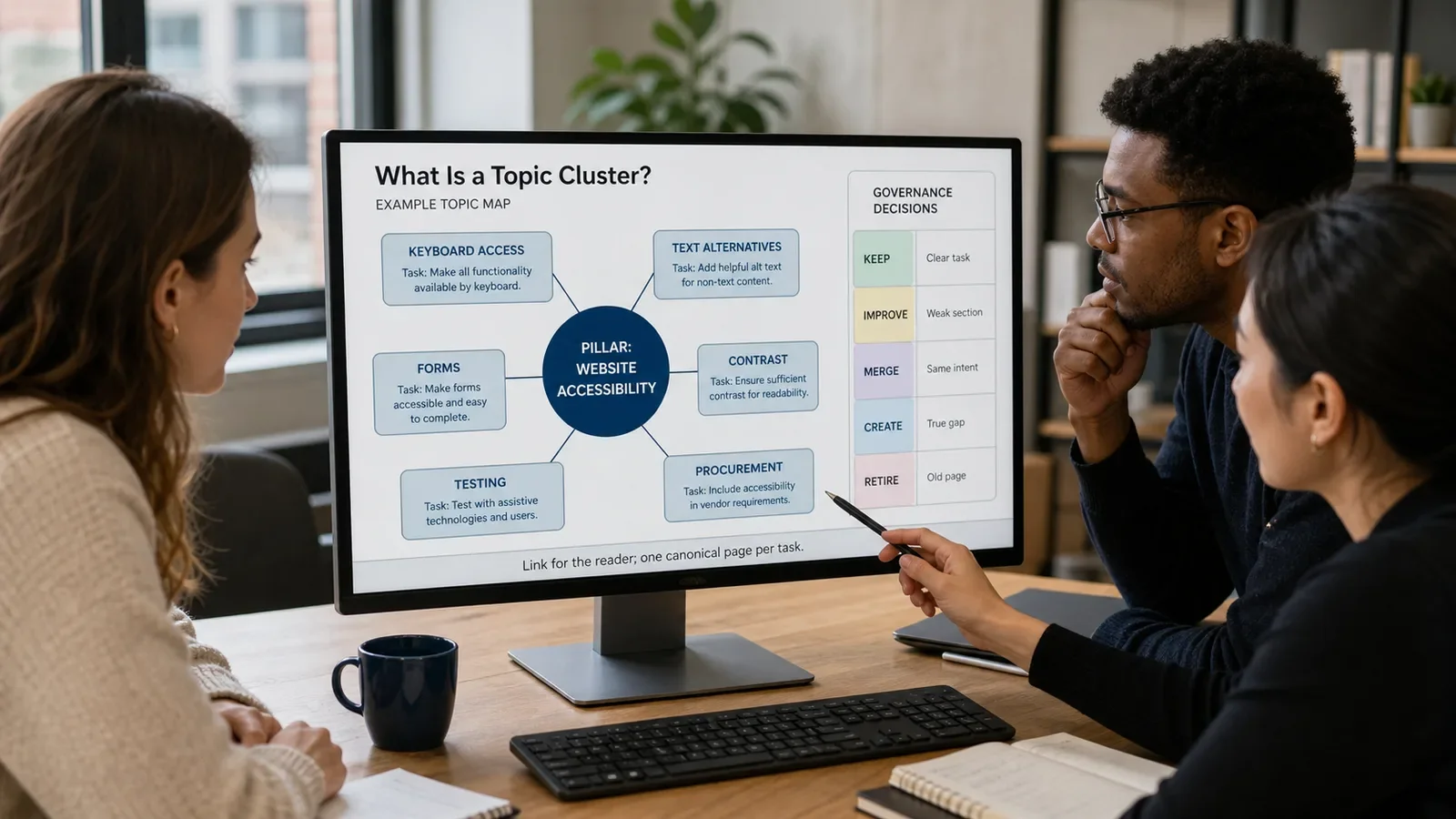
A topic cluster is a planned set of related pages organized around a broad subject. It often includes one pillar page and several supporting pages that answer distinct subtopics or tasks, connected through useful internal links.
A topic cluster is an editorial and information-architecture model. It is not a Google requirement or a promise of topical authority. A cluster should make the site easier to understand and use even if search rankings do not change.
Put It in Plain Words
Pick one broad theme. List the real needs and tasks that sit inside it.
Find the page that should own the broad answer. It may be live now. That page can act as the main guide.
Give each deep page one clear job. If two pages do the same job, fix, join, move, or cut one. Do not link both just to keep them.
Link pages where the link helps the reader. Use words that say where the link goes. Do not add links just to hit a count.
Keep the path easy to crawl. Key pages should have normal links, not live only in a search box or script.
Track gaps and proof. A missed search phrase is not always a missed page. One new part on the main guide may be enough.
Check the set after it goes live. A page can age, clash, move, or lose its job. Change the map when that takes place.
Put the main theme at the top of a sheet. Write each user task in a row.
Add the best live page for each task. Leave the cell blank when there is no good fit.
For each blank, ask if a new page would add true depth. If not, add a short part to the main page.
For each pair of close pages, name which one should stay. Do not wait for both to lose use.
Walk the links as a reader. Can you go from the broad guide to the deep answer and back with ease?
Check each link in the page code. A styled box with no real link may look fine but fail for a user or bot.
Set one owner and next check date for the set. The map must stay alive after the launch.
How Does Topic Cluster Work?
The team defines the broad topic, audience, and job. It inventories current URLs, groups distinct intents, chooses a canonical pillar, and decides which supporting pages should be kept, improved, created, merged, redirected, or retired.
The pillar and support pages link in useful context. Navigation and breadcrumbs may also help. Teams monitor crawling, indexing, use, content quality, and overlap, but they should not treat a ranking change as proof that the cluster alone caused it.
Why Is It Important?
A topic cluster can help readers move from a broad answer to the exact detail they need. It can also help teams govern large content sets and see missing or competing pages.
A weak cluster can multiply thin pages and make a site harder to maintain. The aim is clarity and depth, not the largest possible page count.
Where Is It Used?
Article libraries, learning centers, service education, and support content.
SEO planning, internal linking, migrations, consolidation, and content audits.
Broad topics that contain several durable and distinct user tasks.
A Simple Topic Cluster Example
A website-accessibility cluster may use one broad guide plus distinct pages about keyboard access, text alternatives, forms, contrast, testing, and procurement. Each support page needs its own useful task.
It should not create separate pages for close synonyms that repeat the same answer. Those variants belong in the canonical page when they share intent.
What Should a Cluster Map Include?
The broad topic, audience, and pillar URL.
Each distinct subtopic, task, and canonical URL.
Current links, missing links, and crawl path.
Keep, improve, create, merge, redirect, and retire decisions.
Owner, source needs, risk, and update date.
Measurement limits and review notes.
How Do You Build a Topic Cluster?
Define the topic and user tasks.
Inventory all related current pages.
Group by intent, not keyword alone.
Choose one canonical page per task.
Create only useful missing coverage.
Link, test, consolidate, and maintain.
Topic Cluster vs. Content Silo
A topic cluster is a set of related pages connected around a central subject. A content silo usually means a stronger hierarchical separation between sections. Sites can use both ideas, but useful cross-links should not be blocked by a rigid diagram.
A category page lists or filters items. A pillar page explains the broad topic. A topic cluster includes the pillar, support pages, and the relationships among them.
Common Mistakes
Turning every keyword variation into a page.
Assuming the newest page should be the pillar.
Linking every page to every other page.
Ignoring redirects, duplicates, and outdated URLs.
Claiming that the cluster guarantees authority or rank.
Frequently Asked Questions
How many pages are in a topic cluster?
There is no required number. Include the pillar and the distinct supporting pages the topic genuinely needs.
Do all cluster pages need to link to the pillar?
A clear connection is useful when it helps the reader, but link placement should follow context. Avoid mechanical or misleading links.
Can a topic cluster include product and service pages?
Yes. A useful cluster can include articles, services, tools, case studies, support pages, or other formats when each page has a clear role.
Start with Content Strategy for Better Google Rankings, then use Internal Linking to make each important path clear and crawlable.
Need a cluster map that reduces duplicates instead of multiplying them?
Book a free Brand and Tech Assessment to map the current problem, evidence, constraints, and practical next step.
Sources
- HubSpot: Topic clusters and pillar pages. https://blog.hubspot.com/marketing/topic-clusters-seo
- Google Search Central: Link best practices. https://developers.google.com/search/docs/crawling-indexing/links-crawlable