What Is an SSL Certificate?
Learn what an SSL/TLS certificate does, how browsers check a site identity and public key, and why renewal and HTTPS setup still matter.

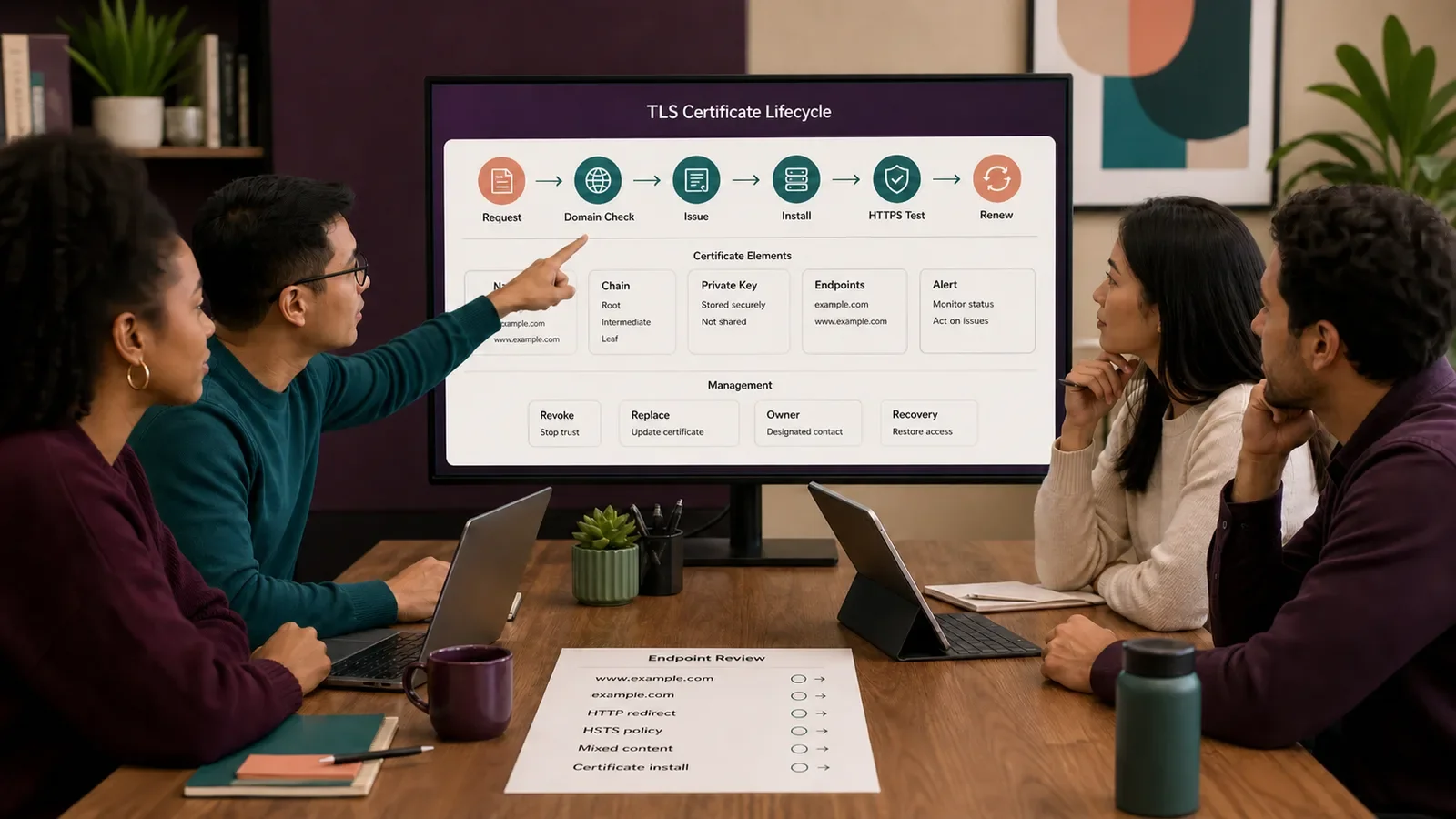
An SSL certificate is a digital file used with HTTPS. Modern sites use Transport Layer Security, or TLS. SSL is the old name. People still use it when they talk about these files.
The file links a public key to a site name or names. A trusted certificate authority signs it. This helps the browser check the name and set up a private link.
Put It in Plain Words
HTTPS uses TLS to protect data as it moves from browser to server and back. It helps keep others from reading or changing that data on the way.
Think of the file as a signed ID card for the site name and key. The browser checks it before it sends data. The card has a start date and an end date.
The server holds a private key. It sends its certificate chain to the browser. The browser checks the name, dates, signature, chain, and other trust rules.
For a domain-validated certificate, the applicant must prove control of the domain. The issuer sets the method for that check. This does not prove that the site or its offer is honest.
Each host name needs to be covered. Check the main name and the www name if you use both.
Install the full chain and use modern TLS. The file alone will not fix old protocols or weak app code. Mixed content and unsafe cookies need their own checks.
Redirect HTTP to HTTPS with care. Check links, media, APIs, sitemaps, and canonical URLs. Each page should load its files through HTTPS.
Renew before the end date. Test the path people use to reach the site. Add alerts and name an owner. Have a way to recover if the process fails.
A key compromise is different from an ordinary hostname mismatch. If a private key may be exposed, revoke the certificate and create a new private key and replacement certificate through the issuer's process. For a name mismatch, first check the server, CDN certificate coverage, and configuration. A name mismatch alone does not mean you must revoke the certificate.
Check each server, load balancer, CDN, and old host that serves the name. One missed host can fail when its old certificate expires.
A secure connection does not prove that a site, business, or purchase is honest. Treat the connection check as a limit, not a guarantee. Browsers show a security status symbol, and it is not a universal padlock.
How Does an SSL Certificate Work?
The site owner proves control of the domain to the issuer. The server gets the signed file and holds the private key. In the TLS handshake, the browser checks the file. The two sides agree on keys for that session.
Watch for errors and end dates. Renew on time. Test each host and chain. Protect the keys. Plan how to revoke a certificate and respond to an incident.
Why Is It Important?
TLS helps protect forms, passwords, cookies, and pages in transit. The browser can also check that the certificate is valid for the name it asked for.
A wrong name or an expired file can cause a browser error. So can a bad chain. Old TLS settings can leave a weak link. These checks are just one part of site security.
Where Is It Used?
Websites, APIs, apps, email links, admin tools, and other network services.
Main domains, subdomains, load balancers, CDNs, and service gateways.
Public HTTPS, internal TLS, and client certificates where the design calls for them.
A Simple SSL/TLS Certificate Example
In a made-up example, a site uses both example.com and www.example.com. Its certificate covers both names, the server sends a valid chain, and all page files load through HTTPS.
The team renews before the end date. It sets an alert and names an owner. It then checks both names, key pages, the API, and redirects. It tests the site from outside its own network.
What Should a Certificate Record Include?
Names covered, service, owner, and business need.
Certificate authority, issue method, chain, and key store.
Issue, expiry, renewal start, alert, and recovery dates.
Servers, load balancers, CDNs, APIs, and old endpoints.
HTTPS redirects, mixed content, cookies, HSTS, and tests.
Key incident, revoke, replace, audit, and retirement steps.
How Do You Set Up and Maintain TLS?
List every name and endpoint that needs the certificate.
Prove domain control through the approved method.
Create and protect the key, then install the full chain.
Set modern TLS and move all resources to HTTPS.
Test names, redirects, APIs, errors, and browser trust.
Automate renewal, add alerts, and rehearse revoke and recovery.
SSL Certificate vs. HTTPS
The certificate is one part of TLS. HTTPS is HTTP sent through a TLS link. The site needs the right file. It also needs a sound TLS and HTTPS setup.
The file is not a seal of trust for the firm. It does not check each claim or stop all fraud. Code, accounts, devices, and staff tasks need their own safeguards.
Common Mistakes
Calling the security status symbol proof that a site is safe or honest.
Renewing one server while missing a CDN or old host.
Leaving mixed HTTP content on an HTTPS page.
Storing private keys in shared notes or source code.
Trusting automation with no alert, owner, or recovery path.
Frequently Asked Questions
Why is it called SSL if sites use TLS?
SSL is the older name. It is still used in product names. Modern secure web links use TLS. The term SSL/TLS helps make that clear.
Does a certificate encrypt stored data?
No. TLS protects data on the move. It does not protect stored files. Backups, logs, devices, and accounts need their own safeguards.
Does HTTPS improve Google rankings?
HTTPS supports connection security, and Google's current page experience guidance lists serving pages securely as one part of overall page experience. There is no single universal page signal, and no guarantee of ranking. Do not treat HTTPS as a direct ranking boost.
Use What Is a Domain Name? for site-name basics and Website Accessibility Guide for a separate public-access review.
Need a certificate and HTTPS plan with real owners, renewal checks, and recovery steps?
Book a free Brand and Tech Assessment to map the current problem, evidence, constraints, and practical next step.