What Is Heading Hierarchy?
Learn how H1 through H6 headings organize a page, support navigation, and make sections easier for people and systems to understand.

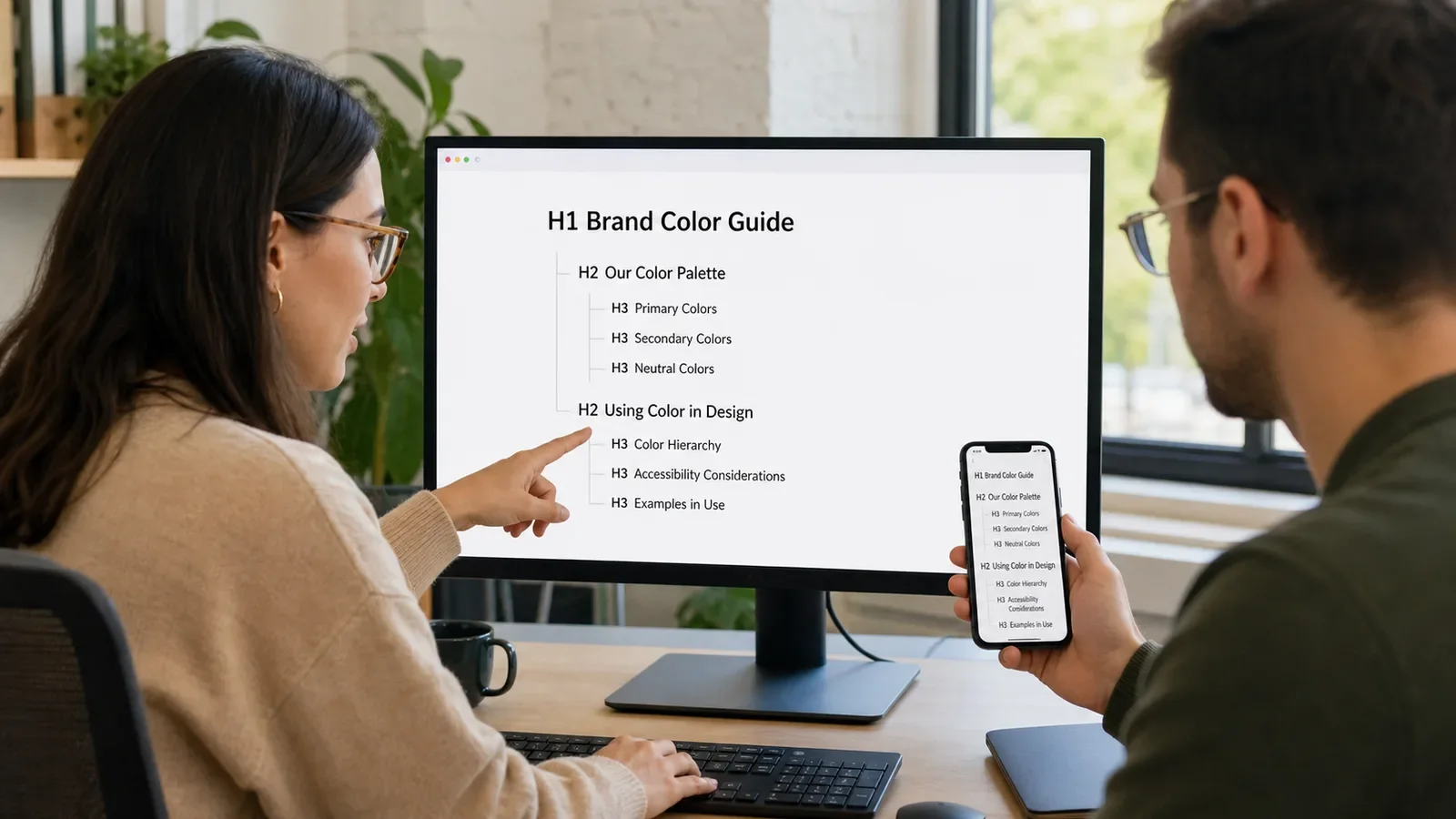
Heading hierarchy is the ordered use of heading levels to show how page sections relate. HTML provides heading ranks from H1 through H6. H1 is the main rank. Lower ranks create sections and subsections under it.
Hierarchy is about meaning, not font size. A heading tells people and software that a new section begins. Visual styling can change, but the structural rank should still match the page outline.
Put It in Plain Words
Think of a page as a simple outline. The page title is the main point. H2 headings name major parts. H3 headings name smaller parts inside an H2 section.
A reader can scan those headings before reading every line. A screen reader user can also use headings to move through the page. Clear labels make that path more useful.
Do not choose H3 because it looks smaller. Use CSS to change size and spacing. Choose H3 only when the section belongs under an H2.
Avoid jumping from H2 to H4 when you are opening a new nested section. W3C guidance says skipped ranks can be confusing and should be avoided where possible.
It is fine to move from H4 back to H2 when the smaller section has ended and a new main section begins. The outline is about relationships, not a rule that numbers may only increase.
Headings should describe what follows. “More” or “Details” gives little help. “How to Test Color Contrast” tells a reader what the section contains.
How Does Heading Hierarchy Work?
The page uses semantic heading elements. Browsers, assistive technology, search systems, and other tools can read those elements. People who see the page also use the visual labels to scan and understand it.
A common article structure has one clear H1, several H2 sections, and H3 subsections where needed. Complex pages can use deeper ranks, but most content does not need all six levels.
Why Is It Important?
A sound hierarchy can make a long page easier to scan, navigate, edit, and maintain. It helps preserve the relationship between a section and its details.
Headings also support accessibility. They are not an SEO trick or a place to repeat keywords. Their main job is to communicate page structure and meaning.
Where Is It Used?
Articles, service pages, product pages, help centers, policies, and reports.
Forms, dashboards, portals, ecommerce pages, and application screens.
Content editors, design systems, CMS templates, and accessibility audits.
PDF and document workflows when headings are correctly tagged and exported.
A Simple Heading Hierarchy Example
A page may use H1 for “Brand Color Guide.” It can use H2 for “How Color Systems Work” and “How to Choose a Palette.” Under the second H2, H3 headings can name “Check Contrast” and “Test Real Uses.”
A weak version uses H2 for every line because the font looks right. That creates a flat and unclear outline. Keep the structure meaningful, then style it with the design system.
What Makes a Clear Heading Structure?
One main page purpose expressed by the H1.
H2 headings for the main sections of that purpose.
H3 and deeper headings only for true subsections.
Descriptive labels that make sense out of context.
Consistent visual styles that do not replace semantic ranks.
A logical reading order on desktop, mobile, and assistive tools.
How Do You Audit Heading Hierarchy?
List the headings in source order without the body copy.
Check that the outline explains the page topic and sections.
Confirm one clear main heading and logical nested levels.
Replace headings used only for visual styling with the right element and CSS.
Rewrite vague labels so each section is easy to identify.
Test keyboard and screen-reader navigation on important templates.
Heading Hierarchy vs. Visual Typography
Heading hierarchy describes the meaning and nesting of sections. Typography controls visual traits such as size, weight, spacing, and color. A designer can make an H2 smaller than a special display line while keeping its semantic role.
A page title is also not always the same as the HTML title element. The visible H1 begins the page content. The title element labels the page in the browser and may help form a search title link.
Common Mistakes
Using headings only to make text large or bold.
Skipping ranks because the preferred font style belongs to another level.
Repeating the same vague heading across many sections.
Making every block a heading and leaving no clear outline.
Changing desktop layout without checking source and mobile order.
Frequently Asked Questions
Can a page have more than one H1?
HTML can allow more than one, but one clear main H1 is easier to manage on most pages. Use lower ranks for major sections.
Is it wrong to skip a heading level?
W3C guidance says skipped ranks can be confusing and should be avoided where possible. Moving back to a higher rank after a subsection ends is normal.
Do headings need keywords?
They need clear meaning. Use the words a reader expects when they fit naturally. Do not repeat terms only to influence search.
Use the On-Page SEO Checklist for the full page review, and connect sections to useful pages with Internal Linking.
Need accessible page templates with a clear content outline?
Book a free Brand and Tech Assessment to map the current problem, evidence, constraints, and practical next step.
Sources
- W3C Web Accessibility Initiative: Headings. https://www.w3.org/WAI/tutorials/page-structure/headings/
- W3C Web Accessibility Initiative: Writing for Web Accessibility. https://www.w3.org/WAI/tips/writing/