What Is Session Recording?
Learn how session replay rebuilds website or app events, what it can and cannot show, and why consent, masking, access, and review rules matter.

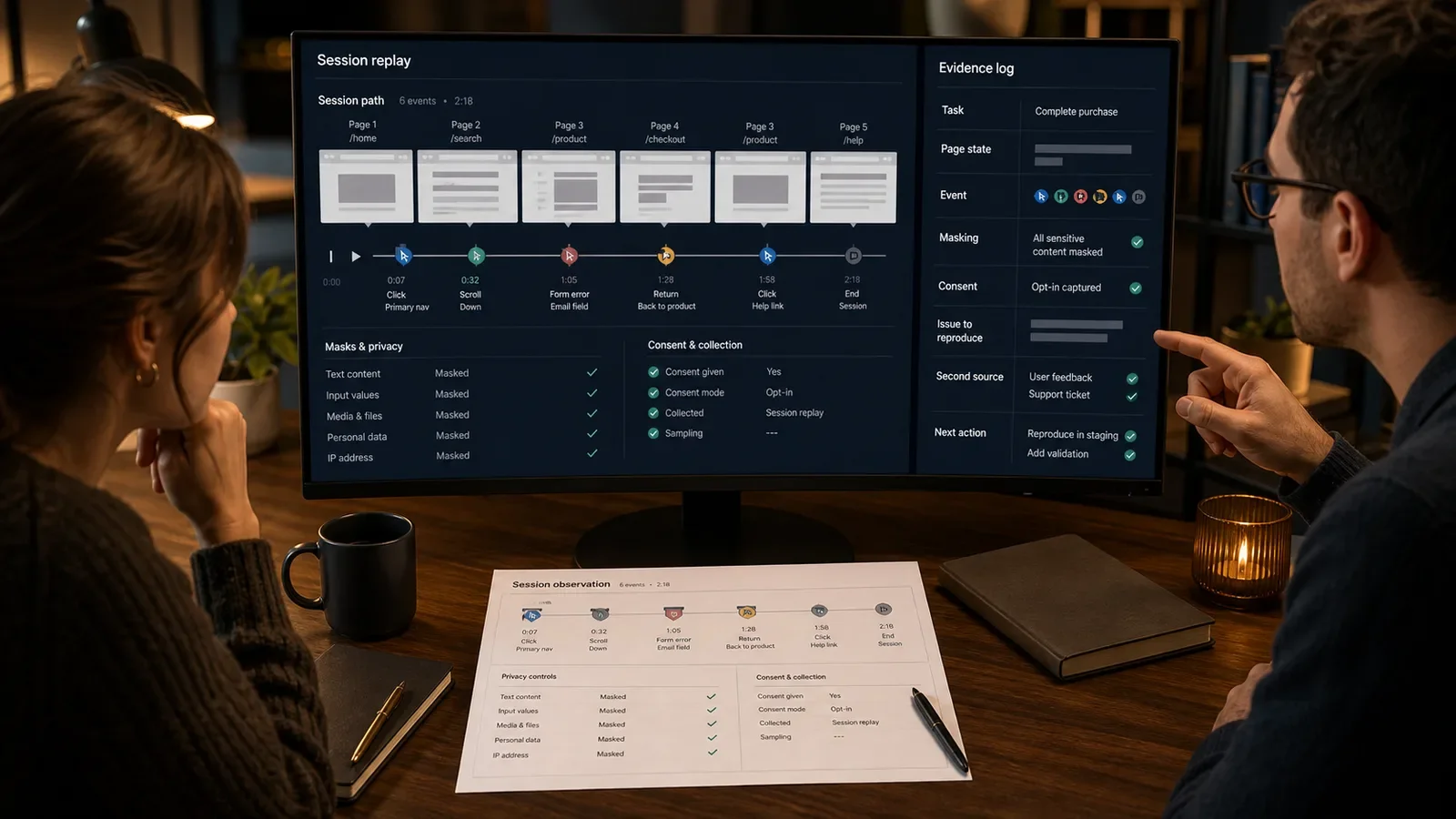
Session recording, often called session replay, rebuilds events from one visit to a website or app. It can show page changes, clicks or taps, scrolls, mouse moves, and other tracked events in order.
Many tools do not make a normal video of the person or screen. They collect parts of the page and its events, then build a visual replay. What appears depends on the tool, the sample, what was masked, and which page files were saved.
Put It in Plain Words
A replay is one tracked path through a site or app. It can help a team see the order of events that a table may hide.
It does not show a person’s thoughts, aim, name, or mood. The team needs other sound proof before it makes such a claim.
A mouse move is not an eye gaze. A pause can have many causes. A fast exit does not prove that someone felt upset.
The page in the replay may not match the page as it first looked. Lost styles, blocked files, live page parts, and later site changes can alter it.
Decide why the replay is needed before adding the tool. One bug check may not justify tracking each page on the site.
List all private pages and fields. Block or mask card data, health facts, passwords, messages, account data, and other private text as needed.
Ask the right owners to check the law, contracts, tool terms, consent, notice, data life, data place, and staff access.
Give access by job role and keep an access log. A replay set must not become office fun or a way to watch staff.
Pick replays with a rule named in advance. Do not hunt for odd or tense clips. That choice can make a false trend look real.
Write down the task, page state, event, and what the team saw. Do not call a user lost or angry unless user study supports it.
Check the issue in logs, site counts, help reports, tests, or user study. One replay is one case. It is not a rate.
Fix clear bugs through the normal release and access checks. Run a fair test only when the open question calls for one.
Keep examples private or hide all private parts. Do not post a replay that could expose a person, account, or private page.
Delete the data on time and remove access when the need ends. Keeping old clips longer does not make them stronger proof.
How Does Session Recording Work?
A tag or app takes a set of page parts and user events. The service stores or reads those events and rebuilds a time line in a player. The view is bound by the tool’s rules for samples and page display.
The team filters visits for a written question, checks the chosen paths, logs what it saw, and confirms the issue with more proof. The data rules should cover the first event through final deletion.
Why Is It Important?
Session replay can help a team repeat a bug, review a hard path, and link events that are hard to read in a site count.
It can also collect private acts and tempt a team to read too much into one clip. A narrow use, clear consent, masking, tight access, short data life, and sound proof are basic needs.
Where Is It Used?
Bug checks, form review, menu review, first-use flows, and help work.
A first look for user study and a check after a site release under set rules.
Web and app review when the data use is lawful, needed, fair in scope, and kept under control.
A Simple Session Recording Example
A team filters for sessions that reached a form error after a release. Several replays show the submit control returning focus to the top without an error summary.
The team confirms the issue in testing and logs. It fixes focus and error handling, then verifies the release. The replay helps reproduce the defect; it does not prove why every person left.
What Should a Replay Plan Include?
Purpose, valid pages, events, and items left out.
Consent, notice, contracts, local rules, and owner.
Masking, user IDs, storage, staff access, and access logs.
Data life, deletion, export, and breach response.
Sample, filters, page state, and known tool limits.
Note form, second source of proof, and next-step rule.
How Do You Use Session Replay Safely?
Name the question and check less private ways first.
Map the data, pages, fields, people, and lawful basis.
Set page blocks, masking, access, and data life.
Check the replay view and event set.
Review a sample named in advance and log what you see.
Confirm the issue, act, check the fix, and delete on time.
Session Recording vs. Analytics
Site analytics tends to group events into counts, paths, groups, or scores. A replay rebuilds one tracked path. The site count can show how often; the replay can show one case.
A user study gives a person a task and lets the study lead ask questions under set rules. Replay shows tracked use with no such talk, so it cannot explain a person’s reason on its own.
Common Mistakes
Recording the whole site without a narrow purpose.
Relying on default masking without verification.
Calling pointer movement attention or intent.
Choosing only dramatic sessions.
Keeping recordings and broad access indefinitely.
Frequently Asked Questions
Is session recording a video?
It is often a picture rebuilt from page parts and user events, not a camera clip or a normal screen video. Check how the chosen tool works.
Can session replay identify a user?
Some setups can link a replay to a user ID or account. That raises privacy and control risk. Gather only what the approved need calls for.
How many recordings should a team watch?
Use a sample or filter plan tied to the question. More hand-picked stories do not replace a base count or a fair user study.
Place replay inside Website Conversion Rate Optimization and use How to Set Up Google Analytics 4 for a separate aggregate measurement layer.
Need an evidence protocol that protects people while helping the team reproduce real problems?
Book a free Brand and Tech Assessment to map the current problem, evidence, constraints, and practical next step.
Sources
- Microsoft Learn: Recordings overview in Clarity. https://learn.microsoft.com/en-us/clarity/session-recordings/recordings-overview
- Microsoft Learn: Clarity FAQ and session-recording architecture. https://learn.microsoft.com/en-us/clarity/faq