What Is Usability Testing?
Learn what usability testing is, how people attempt defined tasks while a team observes, and why consent, access, data, evidence, limits, and ownership matter.

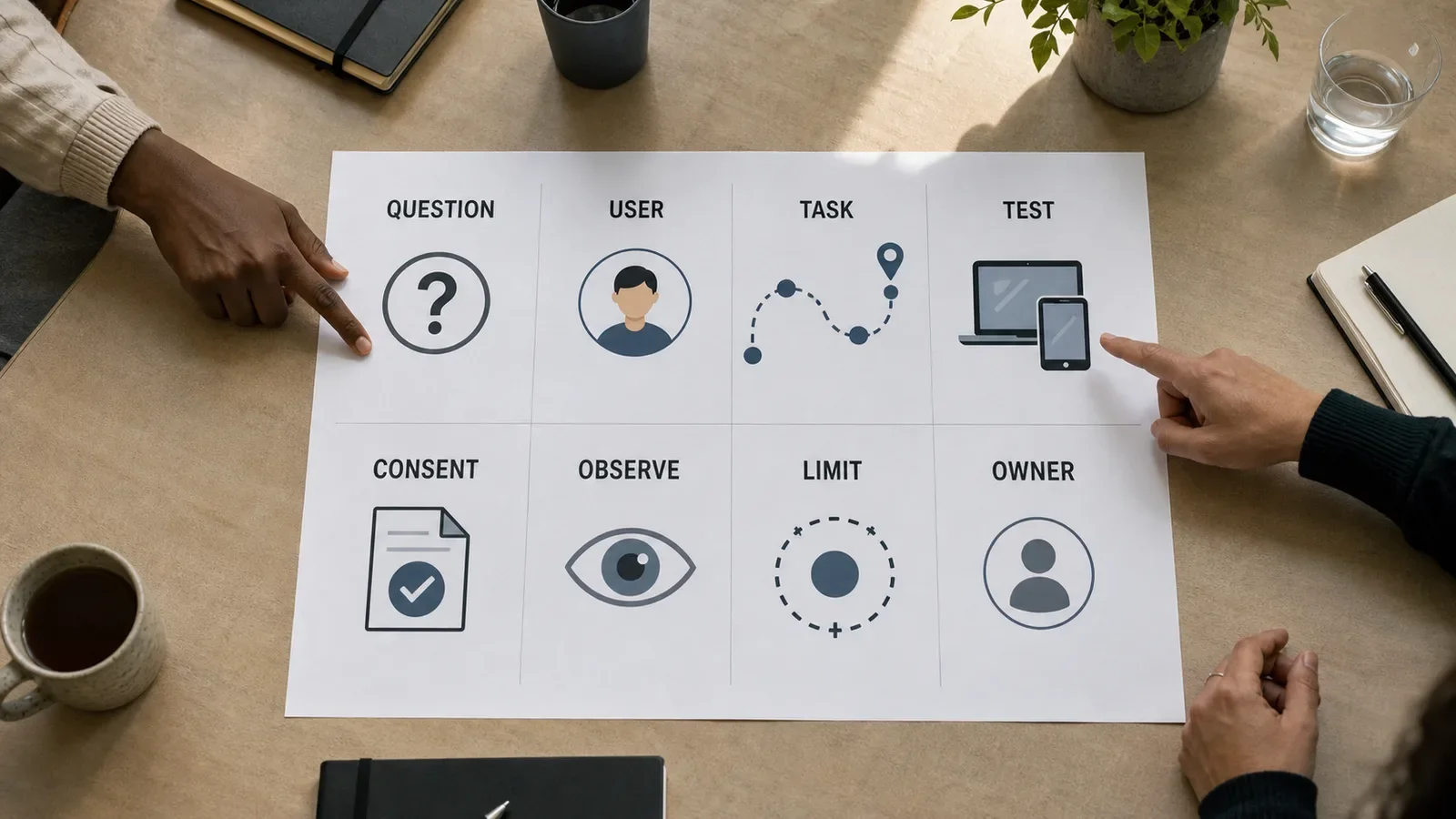
Usability testing is a research method in which people try set tasks with a product, service, site, or prototype while a team watches what happens. The test helps the team find parts that aid the task and parts that get in the way.
It is not a vote on taste or a sales demo. One small test also cannot prove that every person will act in the same way.
Usability Testing in Plain Words
A team may ask a new user to turn off a mail alert. The task has a clear goal, but it does not tell the person which menu or button to use.
The team watches the path. It notes pauses, wrong turns, errors, ways back, questions, and whether the person can finish. A short talk after the task can add context.
The point is to learn from real acts. What a person says is useful, but it does not erase what took place on the screen or in the service.
What Can a Usability Test Show?
A test can reveal:
Labels or instructions that people do not grasp
Steps, controls, or content that are hard to find
Errors with no clear way to recover
Gaps between two screens, channels, or teams
Problems in a prototype before the full build
Access barriers that need deeper review
Ideas that need another test
The result is evidence from a defined group, task, build, and setting. The report should keep those limits clear.
What Does a Usability Test Need?
A sound test needs:
One or more clear research questions
People who fit the task and key access needs
Neutral tasks tied to real goals
A prototype or service that works through the full path
Consent, recording, privacy, retention, and stop rules
Safe test data with no live client, patient, bank, or login records
A host, note plan, observers, and a way to group findings
An owner for each choice and a plan to test the change
GOV.UK advises teams to set clear goals, recruit suitable people, plan consent and access needs, test the prototype, and run a practice session.
A Fictional Usability Test Example
Suppose a team wants to know whether a small-business owner can find an invoice and change its billing address.
Each person receives a fictional account and a short task. The host does not name the menu or the button. Observers record the route, errors, recovery, and comments.
After the round, the team may find that people look under “Account” while the tool hides the address under “Billing profile.” That is a finding about this task and build. It is not proof that all users will fail.
This example is made up. It does not describe a real product or study.
How Do You Run a Usability Test?
1. Set the Research Question
Choose one thing the team needs to learn or decide. “Can a new account owner change a billing address?” is clearer than “Do people like the app?”
2. Choose the Right People
Recruit people who fit the task. Include a useful mix within the group and plan for access needs. A coworker can help with a dry run but may not be a valid participant.
3. Write Neutral Tasks
Describe the goal in plain words. Do not copy the same labels shown on the screen or give a list of clicks.
4. Prepare the Test Safely
Make the path work from start to end. Use safe data. Explain what may be taped, who may see it, how long it will stay, and how the person can pause or stop.
5. Run a Practice Session
Test the script, links, devices, timing, notes, and recording. A dry run can catch a broken path or a task that gives away the answer.
6. Watch Without Teaching
Tell the person that the design is on trial, not them. Give them time to think. If a prompt is needed, keep it open, such as “What do you think this will do?”
7. Analyse and Retest
Keep an observation apart from a guess. “Looked at the top for ten seconds” is an observation. “Did not trust the page” is a theory until the team checks it.
Group the evidence, state the limits, choose changes, assign owners, and run the task again. A rare issue can still deserve action when the harm is high.
Moderated vs. Unmoderated Testing
In a moderated test, a host meets the participant in person or online. The host can ask a fair follow-up question and see the context around a problem.
In an unmoderated test, the person follows a script without a live host. It may help a team reach people in more places, but the script and test setup must stand on their own.
Choose the method that fits the question, risk, access needs, time, and type of evidence needed.
Usability Testing vs. User Interviews
Usability testing watches people attempt defined tasks. Interviews ask people to explain past events, needs, beliefs, or context.
One session may include both. Keep the evidence clear. What someone says they do and what happened during one test are not the same type of fact.
Usability Testing vs. Accessibility Testing
Usability work and access work can support each other, but neither replaces the other.
W3C says work with disabled people can reveal access and ease-of-use issues. It also warns that research with users does not replace checks against accessibility standards. Teams may need code review, keyboard and screen-reader checks, zoom tests, and research with people who use those tools.
How Many Participants Do You Need?
There is no one number for every test. It depends on the question, user groups, method, risk, and strength of evidence needed.
GOV.UK says teams will often use four to eight people in a research round for methods such as usability testing. That is guidance for a round, not a universal law. More groups or high-risk tasks may need more rounds and other methods.
Common Usability Testing Mistakes
Testing a vague preference instead of a task
Recruiting only easy coworkers
Leading people through the intended route
Jumping in before a pause reveals the problem
Using real private data in a test build
Treating a small group as a broad success rate
Mixing notes, guesses, and decisions in one claim
Ignoring access needs or calling one test an access audit
Writing a report with no owner or retest date
Frequently Asked Questions
Can You Test a Paper Sketch?
Yes. A sketch can test a path, order, label, or idea before code exists. Use a live build when the question depends on real states, speed, input, or system response.
Should Participants Think Aloud?
Thinking aloud can help a team hear what a person expects. It can also change the pace of the task. State the method and keep observed acts apart from spoken views.
Can AI Replace Test Participants?
No model can provide evidence from the people whose tasks and access needs the design must serve. An automated review may suggest issues or test ideas, but people still need to check the real task.
Use UX Design Services for the wider research and design path, and the Website Accessibility Guide for broader access testing.
Need a clear test plan for a key user task?
Book TTGC's free Growth Assessment for a brand, content, SEO, and trust review. The current offer is for established practices and is limited to 10 practices per month. Check the linked booking page because terms and space can change.
Sources
- GOV.UK Service Manual: Using moderated usability testing. https://www.gov.uk/service-manual/user-research/using-moderated-usability-testing
- GOV.UK Service Manual: Plan a round of user research. https://www.gov.uk/service-manual/user-research/plan-round-of-user-research
- GOV.UK Service Manual: Plan user research for your service. https://www.gov.uk/service-manual/user-research/plan-user-research-for-your-service
- W3C Web Accessibility Initiative: Involving users in evaluating web accessibility. https://www.w3.org/WAI/test-evaluate/involving-users/